
CommerceHub Inventory Not Updating
0.5 min read
|If Extensiv Integration Manager shows that inventory is syncing successfully to CommerceHub, but CommerceHub or your retailers are saying it is not, follow these steps to find the issue with your inventory setup:
- Login to the CommerceHub OrderStream Dashboard
- Browse to Files > File Error Summary
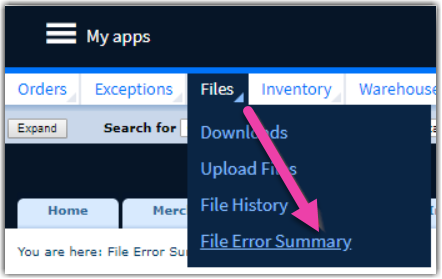
3. In the Inventory row, click one of the numbers that isn't 0 to see a list of errors.

4. You will now see a list of errors that need to be corrected. The most common reason for errors is that the product codes you have setup in your backend system or in Integration Manager don't match the product codes CommerceHub is expecting.
5. When you've identified the problem items and the affected merchant SKU, vendor SKU, or UPC codes that are wrong, read this guide for how to properly setup your CommerceHub product codes in Integration Manager: Setup Merchant SKUs and UPC.